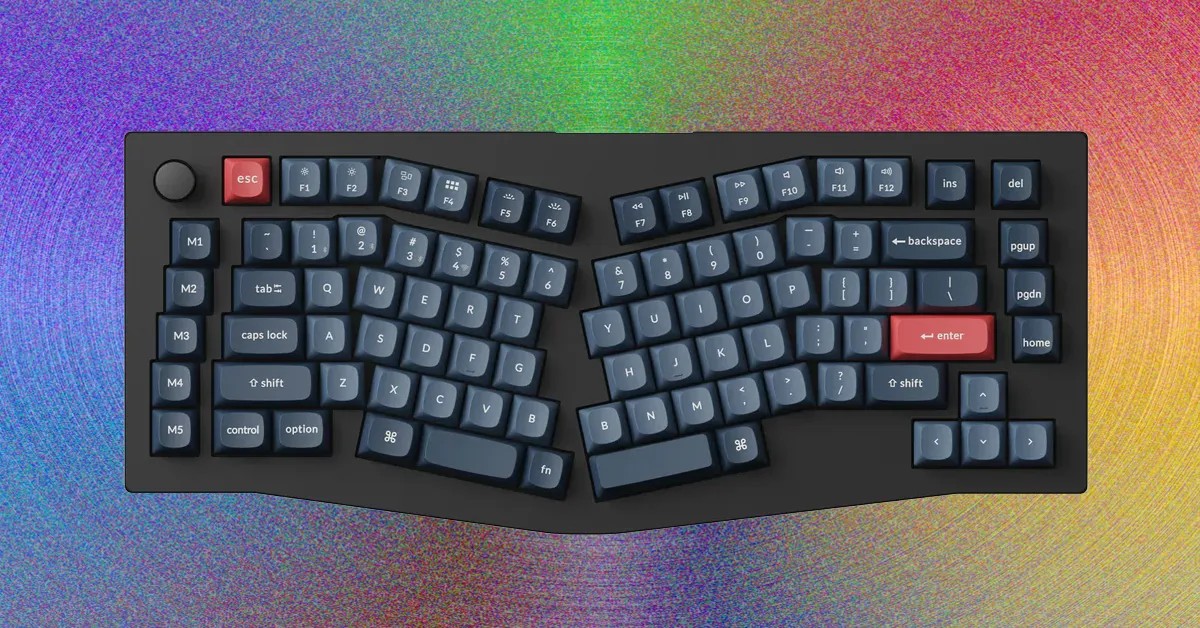
For anyone who spends hours at a computer, whether working, gaming, or simply browsing, the right keyboard can make all the difference. Ergonomic keyboards are no longer a niche product; they’re becoming essential for long-term comfort and preventing repetitive strain injuries. This guide breaks down the different types, benefits, and drawbacks of these specialized peripherals, helping you make an informed decision about upgrading your typing experience.
Why Ergonomics Matter
The traditional keyboard layout can force your wrists and shoulders into unnatural positions, leading to discomfort and potential health issues over time. Ergonomic keyboards aim to mitigate this by optimizing the angle and split of the keyboard to encourage more natural hand and wrist positioning. This isn’t just about feeling better; it’s about preserving your long-term physical well-being. The trend toward remote work and longer screen time makes these keyboards increasingly valuable, as more people spend extended periods at their desks.
Types of Ergonomic Keyboards: A Breakdown
Ergonomic keyboards aren’t one-size-fits-all. Here’s a look at the primary designs:
- Angled (Alice-Style) Keyboards: These feature a split in the center of the alphanumeric keys, creating a gentle angle that reduces wrist strain. The modifier keys (Shift, Enter, Backspace) remain in standard positions, making the transition easier. Keychron’s V10 Max and Q8 Max represent popular choices in this category.
- Split Keyboards: These keyboards are physically divided into two separate halves that can be positioned independently. This allows for extreme customization, enabling users to angle, separate, or even use only one half for gaming. Dygma’s Raise 2 is a premium example, though at a steep price.
- Ortholinear Keyboards: Unlike traditional staggered layouts, ortholinear keyboards arrange keys in a precise grid. This can require a learning curve but theoretically promotes more natural finger movement.
The Benefits: Beyond Comfort
Ergonomic keyboards offer several advantages:
- Reduced Strain: The primary benefit is minimizing stress on wrists, shoulders, and hands. Angled and split designs encourage more natural hand positioning, reducing the risk of carpal tunnel syndrome and other repetitive strain injuries.
- Increased Productivity: While it may take time to adjust, many users report increased typing speed and accuracy once they’ve adapted to an ergonomic layout. The optimized positioning can lead to a more comfortable and efficient workflow.
- Customization: Split keyboards, in particular, offer extensive customization options, allowing users to tailor the layout to their exact preferences.
The Learning Curve and Downsides
Switching to an ergonomic keyboard isn’t always seamless. There’s a learning curve involved, and it can take weeks to fully adapt. Gaming performance may also suffer initially, as muscle memory built on traditional layouts needs to be retrained. Some split keyboards require connecting one half with a cable, limiting wireless freedom. Additionally, high-end ergonomic keyboards can be expensive, with some models exceeding $300.
Our Top Picks: Balancing Performance and Comfort
- Keychron V10 Max ($125): A solid Alice-style keyboard with excellent build quality and customization options. The gasket-mount system provides a comfortable typing experience.
- Keychron Q8 Max ($240): A premium upgrade with an all-metal case for enhanced durability and typing feel.
- Dygma Raise 2 ($369+): The ultimate split keyboard for extensive customization, though at a significant price.
- Asus ROG Falcata ($280): Ideal for gaming, featuring Hall effect switches with customizable actuation points and ultra-fast polling rates.
- Keychron K15 Max ($100): A low-profile option perfect for portability and productivity, offering a dedicated function row and macro keys.
Conclusion
Ergonomic keyboards are more than just a trend; they’re a valuable investment in long-term comfort and productivity. Whether you’re a programmer, writer, gamer, or office worker, upgrading to an ergonomic keyboard can significantly improve your typing experience and reduce the risk of strain injuries. The key is to choose a layout that suits your needs and be prepared for a learning curve.