The KYY X90G portable monitor extender isn’t just another screen; it’s a bold experiment in desktop real estate. While portable monitors have existed for years, this device doesn’t aim to refine the concept—it multiplies it. The question isn’t whether more screens are better, but what four screens feel like.
The Quad-Screen Concept
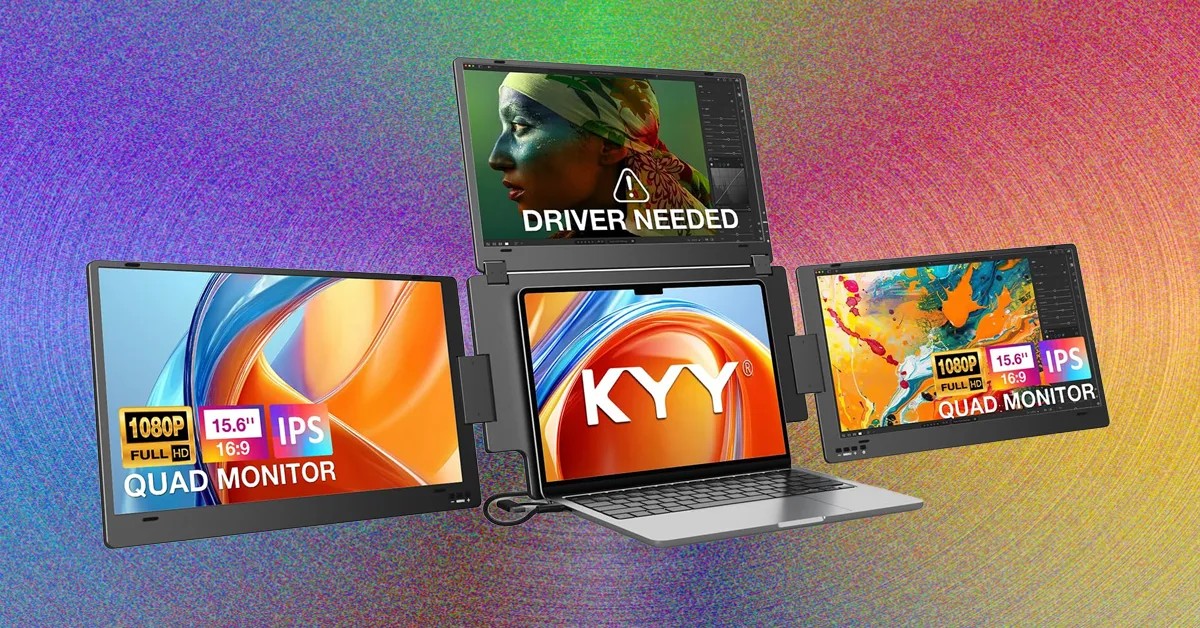
The X90G unfolds into a three-screen array that flanks your laptop, creating a quad-display setup. Each 15.6-inch IPS LCD panel (1920×1080) connects to a central backing board via robust hinges. The top screen pivots, potentially for presentations, while the side screens angle for usability. Fully extended, it spans nearly four feet wide and weighs 6.4 pounds—making portability a secondary consideration.
This isn’t about on-the-go work; it’s about creating a temporary, ultra-wide workstation wherever you can plug in.
Power and Practicality
The X90G demands attention not just in size, but in power consumption. It pulls up to 30 watts, potentially overwhelming laptop USB ports. The included adapter solves this, but often requires two AC outlets—a limitation for coffee shop warriors.
Each screen has independent controls for brightness, color, and contrast. While the factory settings are workable, the default brightness is too dim for serious use. Windows integration is simple, allowing seamless desktop extension.
Resolution Limitations & Ergonomics
The 1080p resolution of each screen is the biggest constraint. It limits productivity for detail-oriented work, making a higher-resolution setup more practical. The side panels require angling to face the user, resulting in an awkward diagonal alignment. This is a deliberate compromise; further hinge articulation might compromise durability.
The device is not perfect, but it’s a workable solution.
Real-World Use & Value
At $600 (often discounted from $700), the X90G isn’t cheap. Yet, once set up, it’s hard to go back. The top screen significantly improves ergonomics by bringing critical work closer to eye level. Side screens handle chats, research, and less-demanding tasks. The laptop display remains for high-resolution applications.
The X90G isn’t a travel companion, but it excels in stationary remote work. Users should pack a power strip.
This setup fundamentally changes the workflow. It’s an aggressive, unapologetic solution for those who need more screen space above all else.
Ultimately, the KYY X90G isn’t a subtle upgrade; it’s an extreme solution for extreme productivity needs. While its limitations are real, the benefits of a quadrupled display are undeniable for the right user.